Inventory Track and Management is a Windows desktop application designed to help businesses efficiently manage their inventory, purchases, sales, suppliers, and customers in one place. With features such as Item Master, stock purchase and sales management, real-time stock balance tracking, reorder alerts, dashboard insights, detailed reports, Excel import/export, and database backup and restore, the software provides a simple and organized way to keep track of inventory and monitor day-to-day business transactions.
Key Features
This Inventory Management software has below mentioned features.
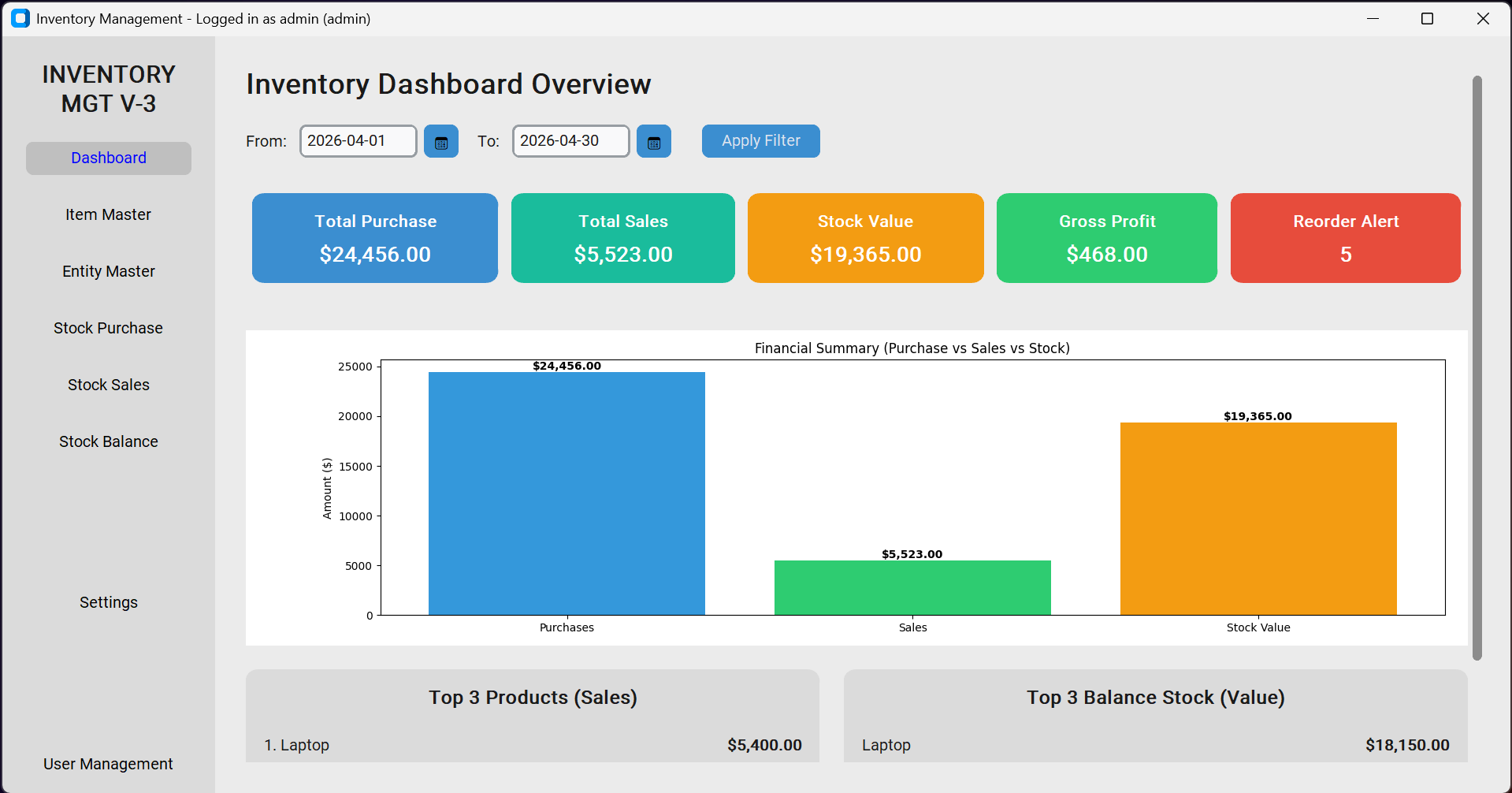
- Dashboard with total purchases, total sales, stock value, gross profit, and reorder alerts
- Item Master for managing item codes, names, units, purchase prices, selling prices, and minimum stock levels
- Supplier and Customer Management
- Stock Purchase Management with invoice, supplier, quantity, rate, and amount details
- Stock Sales Management with invoice, customer, quantity, rate, and amount details
- Stock Balance tracking with opening, incoming, outgoing, and available stock
- Automatic stock availability checking during sales
- Reorder alerts when stock falls below the minimum stock level
- Stock valuation based on purchase or selling price
- Purchase, Sales, and Stock Balance reports
- Date-range filtering for reports and dashboard analysis
- Excel export for inventory and reports
- Search and filter functionality for inventory and transactions
- User Management with administrator and user roles
- Password and administrator recovery features
- Application settings including currency and stock valuation preferences
- Database backup and restore
- Automatic local database protection and recovery
- Local SQLite database for storing inventory and business data
- License activation and verification (100% free and Lifetime)
Operating Guideline
To learn how to operate this software consider below given key points.
- First, enter the item/product details in the Item Master.
- Start entering the purchase and sales transaction.
- See the balance of stocks in stock balance section which gets auto calculated.
- See the overview of Total Purchase, Sales, Balance and Gross Profit, Top Products in the dashboard section.
- If you want to use currency symbol in the dashboard, set up in the settings.
- Periodically keep data backup for safety purpose. If computer is formatted or switched to new computer, you can restore the backed-up data.
- Create admin account for full access and normal user accounts for limited access.
For more clarity on how to operate instructions, watch the YouTube video tutorial from below.
Video Tutorials
After version 1 video tutorial (features and operating guide) release in YouTube, there has been significant feature updates in the software. To understand the full functionalities and operating guide, I recommend watching all version tutorials.
Version 1 (Feature and Operating Guide): https://youtu.be/FF4BJ4bWVuE
Version 2 (New Feature Updates): https://youtu.be/EsASsLeCqDQ
Version 3 (New Feature Updates): https://youtu.be/1GAXhHF3hdk
Version 4 (Latest with Full Features): https://youtu.be/0Pnh89te3Ck
Software Download
Click on below image to download Inventory Track and Management Software from Microsoft Store.


How to import from excel stock in data entry and stock out data entry from import excel
Hello Sir, kindly update this software (multiple enteries of products in one invoice purchase or sale).
Thanks for sharing. Please update entity master during registration of suppliers contact data go to address and adress data go to contact. Thanks 👍
Cannot download V3 and V4. By the way, thanks for the system.
I have fixed the issue in Download link. Now you should be able to download.
Thank you so much brother..
Hey guys, I cant even download version 2. Link is not responsive. Is there a special browser to use for this download?
The version 2 link has been updated. Please retry download. It should work now.
Thanks. That was helpful and I managed to download the app. Please also update link for version 3.
It appears version 3 of the app is facing (or maybe just me) about the download link. Please update for us.
I have fixed the issue. Now you should be able to download.
It’s asking for Login details
admin
admin
is the default username and password
Nice one sir,
Please can you add stock issuance for production instead of sales.
please can i have your email for personal reasons.
Please i have send you personal email on spreadsheetforu@gmail.com concerning this.
can you please respond to me?
I will check and reply.
When i run the setup it requires user and password i dont have these two
during installation it is asking password? or when launching? If during launch, username and password both is “admin”.
Hello,
is it possible to make a version with a flexible sale price. For example, during sale event, the sale price was discounted, so how to have the sale entry for a product with discounted price? Thanks
The latest version has this feature.
I just tried the software, but every time I try to enter sales entry, it says Insufficient stock available and does not add the sales entry.
to enter sales transaction, you should have done purchase first. Please check if the stock is available for what you are selling.
there no import from EXCEL sheet option
I will try to include this in the new version.
Hello I downloaded the software, and it is beautiful. However, Item Master, is there no import from EXCEL sheet option?
Manual Entry is very time-consuming.
If you add this option software is really complete..
I am working on it, may be on next version, it will be included.