📊 Take full control of your finances with this powerful yet intuitive Excel VBA tracker. Ditch the complicated apps — customize categories, track every transaction, and visualize savings. Best of all: it’s 100% free.
📌 Why Choose an Excel‑Based Tracker?
Spreadsheets offer flexibility that rigid apps can’t match. By harnessing the power of Excel VBA, this template transforms a standard spreadsheet into an interactive application. You get the familiarity of Excel combined with the functionality of a custom‑built app, ensuring your data remains private and secure on your own computer.
⚙️ Key Features That Simplify Money Management
This tool is designed with the user in mind. From data entry to visual analysis, every feature is built to make financial tracking seamless.
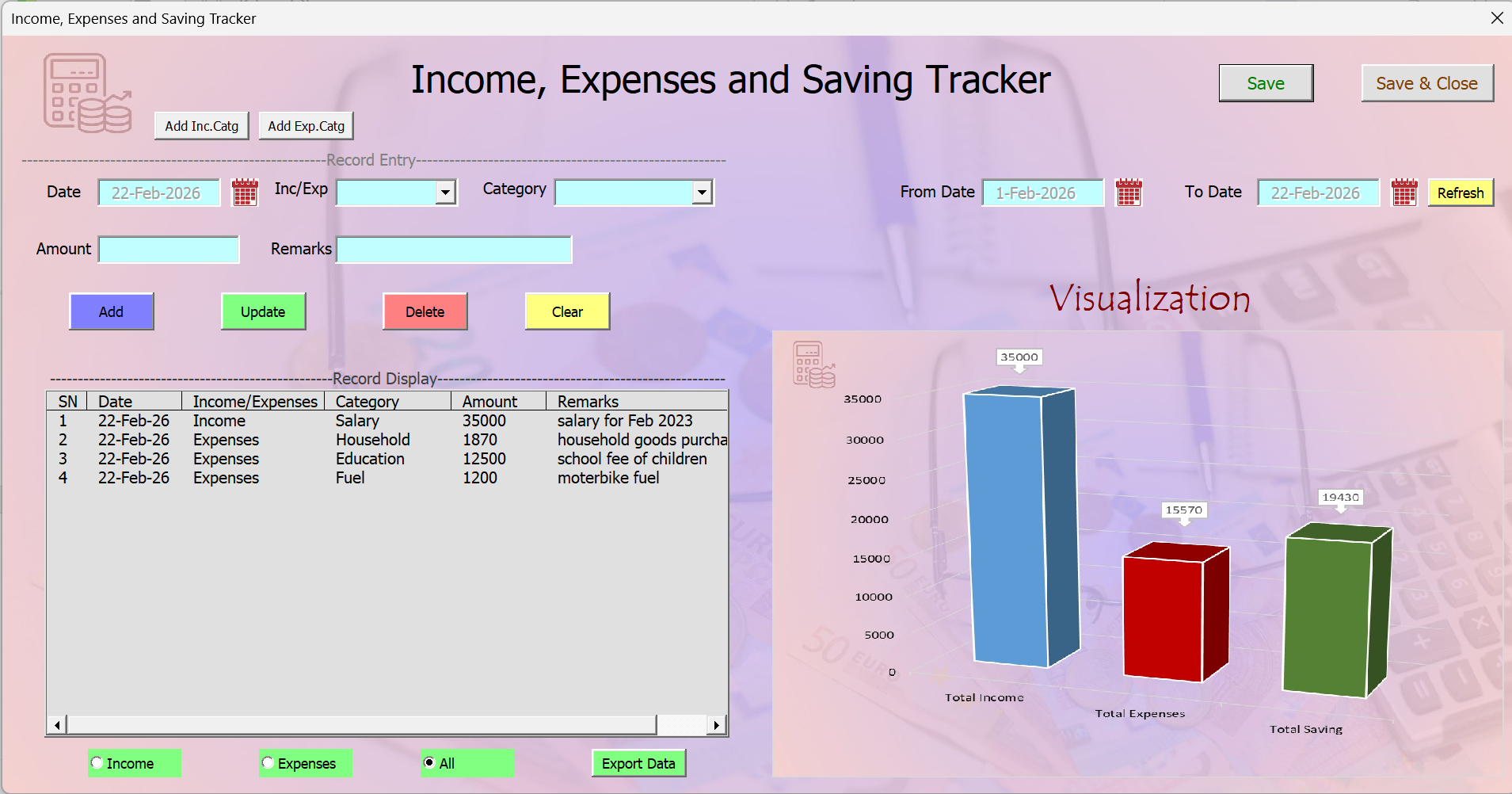
Custom Income & Expense Categories
No two budgets are alike. Easily add custom categories for both income and expenses. Whether you need “Freelance”, “Dividends”, “Pet Care” or “Subscriptions” — tailor the dropdowns to your life.
Add, Update, Delete, Clear
Full transaction control: quickly log new entries, select and update details, delete mistakes, or clear input fields with one click — all with dedicated VBA buttons.
Smart Date Filtering & Separate Views
View transactions by specific date range (week/month/quarter). Toggle to see only income or only expenses — perfect for reconciling earnings vs. spending.
Dynamic Bar Chart: Income vs. Expenses vs. Savings
Numbers on a sheet can be hard to digest. At a glance, a clean bar chart visualizes your total income, expenses, and savings. Instant financial health check.
One‑Click Data Export
Need to share or archive? “Export to New Sheet” creates a clean copy of your data in a fresh worksheet — perfect for backups or external analysis.
Convenient Save & “Save and Close”
Automate your workflow: hit Save to commit entries, or Save and Close to store changes and exit the app in one go.
🔍 Smart Data Viewing & Control
- View by Date Range: Easily analyze specific periods (week, month, quarter) to identify spending patterns.
- Separate transaction views: Toggle to see only income or only expenses – makes reconciling effortless.
- Visual summary: The bar chart updates automatically based on your filtered or full data.
- No external dependencies: Everything lives inside your Excel file. No subscriptions, no cloud uploads.
👥 Who Is This Tracker For?
This versatile tool is perfect for a wide range of users:
Track household budgets, separate business income from personal expenses, or simply monitor progress toward savings goals — all without complex accounting software.
Ready to master your money?
Get the Income, Expense & Savings Tracker now.
⬇️ Download Free Template💬 How to Support & Share
If you find this template useful for your daily finances, please consider sharing this article with friends or colleagues who might also benefit from a simpler way to track their money. Have suggestions for future features? We’d love to hear your feedback in the comments below (or via contact).


Great post, Thanks for sharing this valuable information. Keep up the excellent work